
Your first appointment, start to finish.
Everything you need to do before your first visit — in order, with nothing buried in a PDF you have to go hunting for.
Most first appointments happen over secure video. Plan for about an hour. You will leave that appointment with a diagnosis and a treatment plan — not another appointment to find out what they are.
Before your first visit
Five things, in this order. Most of them take a few minutes.
-
1
Schedule your evaluation
Text or call (208) 898-8999. Every new patient starts with an evaluation — a structured diagnostic interview, not a ten-minute screening.
-
2
Complete your new patient paperwork
Download the forms below, fill them out, and submit them to the office before your appointment. They take an average of 30 minutes to fill out.
-
3
Set up Zoom
If your appointment is by telehealth, install Zoom and configure your audio ahead of time so you are not troubleshooting when your visit begins.
-
4
Complete your same-day surveys
Research-level evaluation surveys arrive by text or email and are also on the patient portal. Finish them at least 30 minutes before your appointment start time. It usually takes less than 5 minutes to complete.
-
5
Have your photo ID ready
We require a valid photo ID for everyone receiving care — a government-issued ID, or one we take in-office.
Forms and documents
Download, complete, and return these to the office before your appointment. These are separate from the same-day surveys sent to you by text or email.
Photo ID is required
To protect our patients and ensure compliance with insurance regulations, we require a valid photo ID for all individuals receiving care. This can be one we take in-office, or a government-issued ID such as a driver’s license, passport, or state ID card. This policy helps us prevent identity theft and insurance fraud. If a patient is unable or unwilling to provide photo identification, we will respectfully assist them in finding an alternative clinic.
Using the patient portal
Your surveys, your records, and anything you need to send your provider all live in one place.
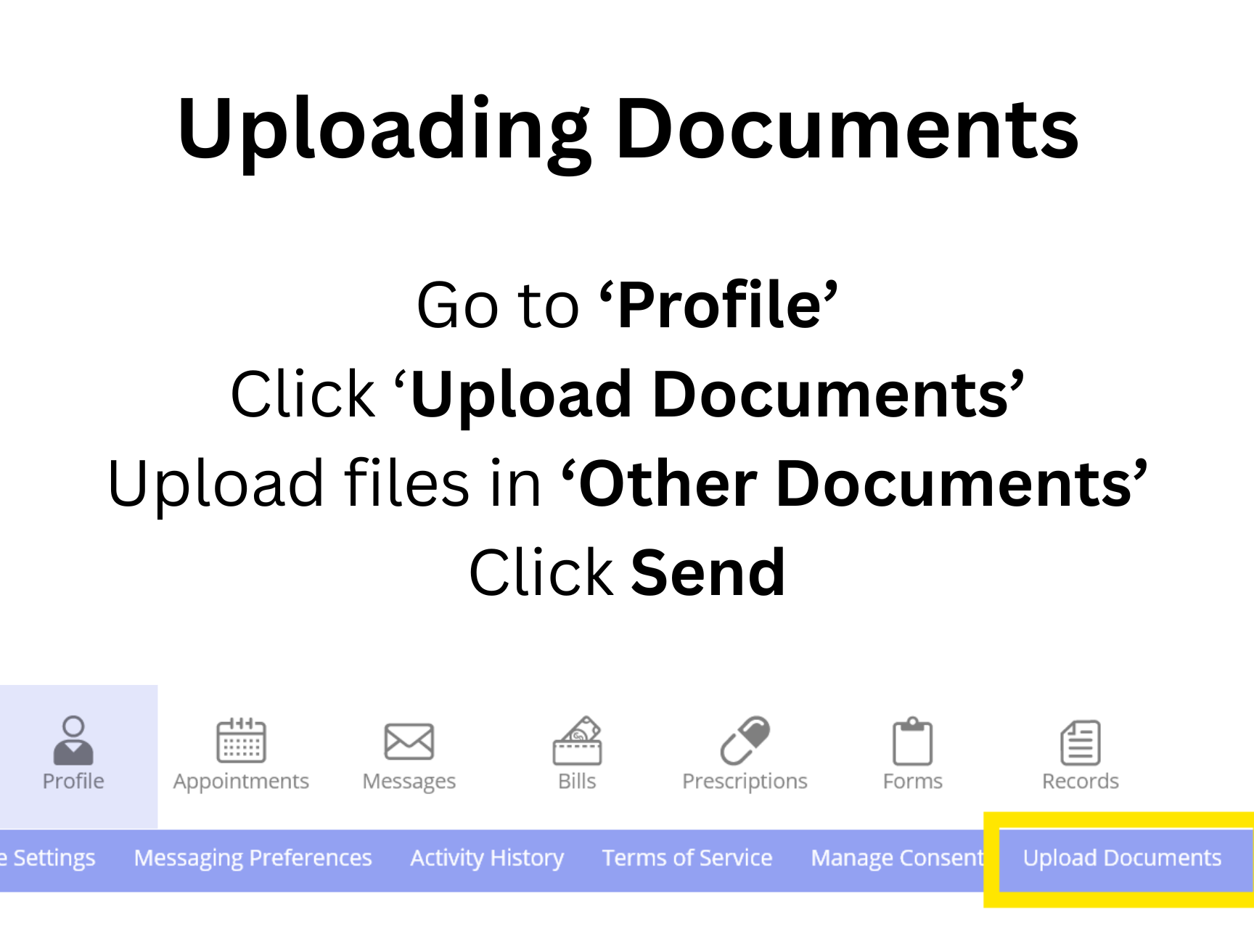
Upload documents for your provider
Go to Profile, click Upload Documents, add your files under Other Documents, then click Send.
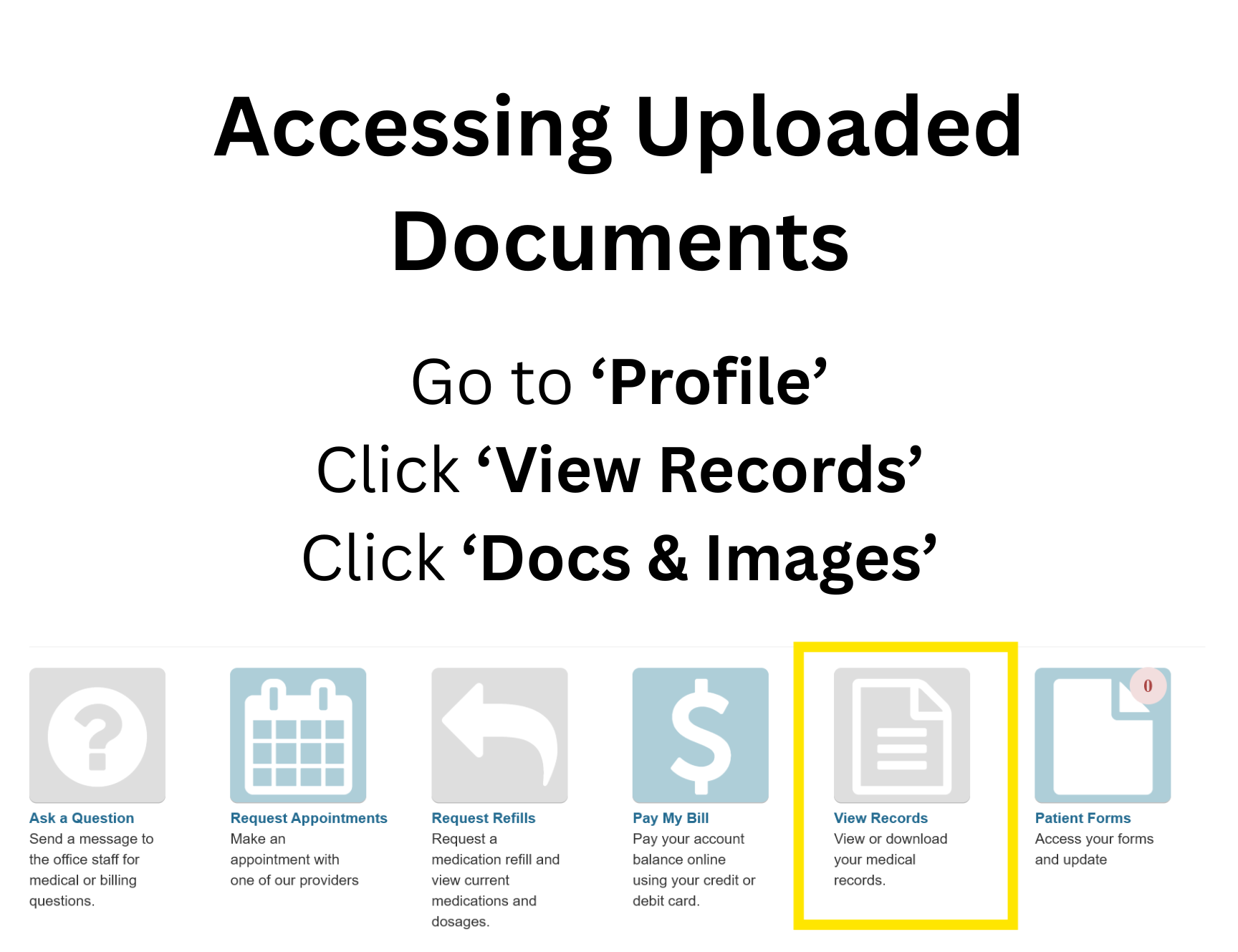
Download a copy of your records
Go to Profile, open your records, and click Docs & Images to view everything on file.
Setting up Zoom
Four steps, done once. Do them before your appointment day so your visit starts on time instead of in a settings menu.
Download the Zoom app
The download page detects your computer type automatically. On a phone, get Zoom from the App Store or Google Play.
Download Zoom →Check your video and audio
Open Zoom’s settings and confirm your camera and microphone work before your appointment day.
Turn on automatic audio
On a phone: Settings, then Meetings, then select Auto Connect Audio. On a computer: Settings, then Audio, then tick Automatically join audio. In both cases make sure Mute my microphone is NOT selected.
Joining from your computer
Open the appointment email from our office, click Join the appointment, you will be prompted to enter your last name and date of birth, then click Join Call. You will wait briefly in a virtual waiting room until your provider admits you.
Joining from your phone
Tap the link in the text message the office sends you. Zoom opens automatically and places you in the waiting room.
Insurance and payment
We are in-network with all major Idaho health plans and several out-of-state plans, and we offer deeply discounted self-pay rates.
We are in-network with
- Aetna PPO, Trinity
- Allegiance Benefit Not if it is Woodgrain SAHS
- Allied Benefits Only if Aetna is on the card
- Blue Cross
- Blue Cross Federal Evaluation must be with Dr. Hoopes or Steve Barnum
- Blue Shield No Legacy Health or University of Utah
- ComPsych HWD prefix — Dr. Hoopes and Joana Gonzales only
- Employee Benefit Management Services (EBMS)
- First Choice Health Network
- Health Management (HMA)
- Meritain Health
- Moda Card must show Select or Aetna — all other Moda plans are out-of-network
- Mountain Health Co-Op SAHA, or St. Luke’s Engage/Link on the card
- PacificSource SLHP and Oregon plans — not Smart Alliance
- Regence Group Administrators (RGA)
- Select Health SLHP, or St. Al’s on the card
- St. Luke’s Health Plan
- Trustmark
- WebTPA
Every carrier offers several different plans, so please verify that our providers are covered under your specific plan. Prefix notes: XMF has no mental health coverage; XMS and XMM are True Blue / Medicare.
If we are out-of-network with your plan
We are no longer able to bill insurance carriers we are not in-network with, because those carriers will not accept claims from us. They may accept a claim submitted by you directly — you will need to ask them to verify. We also offer deeply discounted self-pay rates for patients who prefer not to use insurance at all.
What to ask when you call your insurer
- Does my plan cover out-patient mental health services?
- Are my out-patient mental health services through you, or through another company? (For example, Hewlett Packard employees usually have Blue Cross, but their mental health goes through ComPsych.)
- Is Live Well Psychiatry an in-network provider with my plan?
- What will my co-pay or co-insurance be with Live Well Psychiatry?
Some carriers verify each provider individually. Ours are: Scott Hoopes MD, Kaden Facer MD, Joana (Gladys) Gonzales PA-C, Crystal Odegard PA-C, Jennifer Hua PA-C, Kristin Hawkins PA-C, Steve Barnum FNP-C
Common questions
What happens at my first appointment?
Every new patient starts with an evaluation — a structured diagnostic interview based on the DSM-5. Your provider collects your lifetime symptom history, reviews the surveys you completed beforehand, and asks a lot of questions.
At the end of the appointment you receive a diagnosis and discuss treatment options. You leave with a plan, not a follow-up appointment to find out what the plan is.
How long does it take?
Plan for approximately an hour with your provider, plus the time it takes to complete your surveys beforehand. Follow-up appointments are considerably shorter.
Do I have to come into the office?
Most appointments happen by secure telehealth video, and we see patients throughout Idaho. Boise-area patients can learn more about telehealth in Boise. In-office appointments are available at our Meridian location, and TMS treatment is always performed in the office.
What if I have Medicare or Medicaid?
Our office does not accept Medicare or Medicaid. If you have Medicare and still want to be seen here, you will be required to sign an Opt Out form provided by the office and become a self-pay patient.
What if you are out-of-network with my insurance?
We are no longer able to bill insurances we are not in-network with, because those companies will not accept claims from us. They may accept a claim submitted by you directly — you will need to ask them to verify.
Do you offer self-pay?
Yes. We offer deeply discounted rates for patients who prefer to pay without using insurance. Call the office for current self-pay pricing.
Why do you need a photo ID?
A valid photo ID protects our patients and keeps us compliant with insurance regulations by preventing identity theft and insurance fraud. It can be a government-issued ID such as a driver’s license, passport, or state ID card — or one we take in-office.
Ready when you are.
Text or call to schedule your evaluation. If you are not sure whether we are in-network with your plan, call us anyway — we will help you work it out.
